How to Use BBO Orders in Bitget Futures?
[Estimated reading time: 5 mins]
A BBO (Best Bid Offer) order is a specialized type of limit order for Bitget futures trading. It automatically matches the best bid or offer, aiming for faster execution at optimal prices. BBO orders streamline trading with minimal effort.
Benefits of BBO orders
Thanks to their unique mechanism, BBO orders offer the following key benefits:
• Faster execution: BBO orders automatically match the best bid or offer, reducing the need for manual price adjustments — ideal for volatile markets.
• Optimized pricing: By locking in the most favorable price from the order book, BBO helps traders lower trading costs or boost profits.
• Ease of use: No need to constantly monitor the market; the system automatically adjusts order prices, simplifying the trading process
• High flexibility: Supports both opening and closing positions; suitable for various trading strategies including high-frequency trading and trend-following.
Core use cases for BBO orders
|
Trading strategy
|
Best for
|
Key points
|
|
Taker
|
Willing to pay transaction fees for immediate execution
|
Buy at best offer, sell at best bid
|
|
Maker
|
Cost control, no urgency to fill
|
Place order outside BBO and wait for a match
|
|
Spread arbitrage
|
Capitalize on short-term opportunities from large bid-ask spreads
|
Place both buy and sell orders to profit from the spread
|
|
Iceberg order
|
Execute large trades without impacting the market
|
Hide true order size to reduce market impact
|
|
BBO-SL
|
Adjust SL (Stop-Loss) dynamically
|
Use market depth to avoid extreme slippage
|
How Does a BBO Order Work
When you place a BBO order in Bitget futures, you select one of four pricing options. The system sets the order price based on the live market at that moment:
1. Counterparty 1
• Buy order: Sets the price at the lowest current ask
• Sell order: Sets the price at the highest current bid
2. Queue 1
• Buy order: Sets the price at the highest current bid
• Sell order: Sets the price at the lowest current ask
3. Counterparty 5
• Buy order: Uses the 5th lowest ask price
• Sell order: Uses the 5th highest bid price
4. Queue 5
• Buy order: Uses the 5th highest bid price
• Sell order: Uses the 5th lowest ask price
Note: The price is dynamically adjusted at the time of placement based on your selection.
How to Place a BBO Order
Using BBO orders on Bitget is simple. Here's how:
1. Go to the trading page: Log in to your Bitget account and navigate to the futures trading section. Select your desired trading pair (e.g., BTCUSDT).
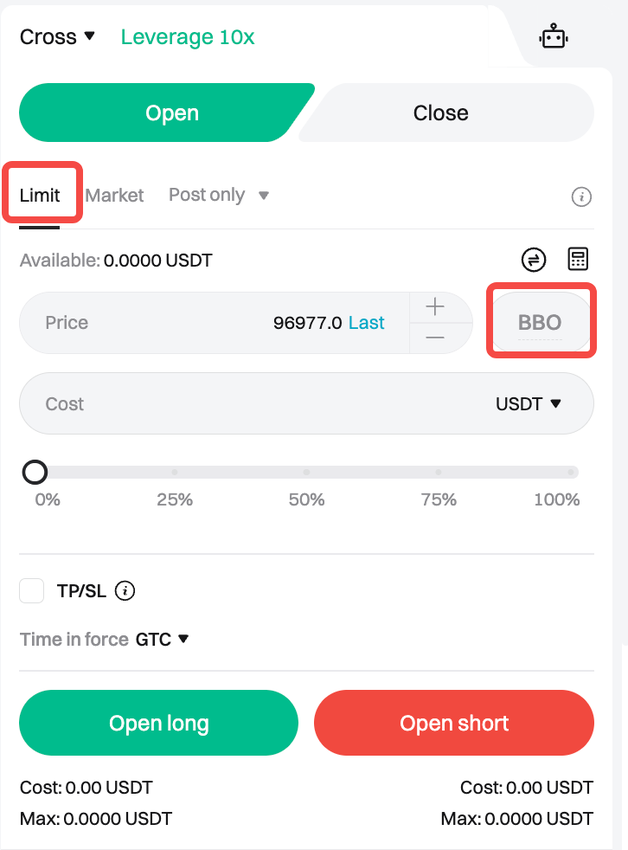
2. Enable BBO order: In the order type dropdown, select Limit, then choose BBO to enable this mode. Next, select a reference type, such as Counterparty 1 or Queue 5.
3. Adjust trading parameters:
• Enter your order quantity (e.g., in BTC).
• Choose your leverage (e.g., 20x) and position direction (long or short).
• (Optional) Set TP/SL price.
4. Confirm order: Review the order details (cost, max trading volume, etc.) and click Open Long or Open Short to submit the order.
5. Track order: View execution status in the Open Orders or Order History section under BBO orders.
BBO orders vs. limit orders
|
Feature
|
BBO order
|
Limit order
|
|
Price setting
|
Auto-matching best bid or offer
|
Fixed price manually set by the user
|
|
Execution speed
|
Instant or faster execution
|
Dependent on market reaching specified price
|
|
Complexity
|
Simple—no need for manual price adjustments
|
Monitoring and manual updates required
|
|
Best for
|
Fast-moving markets, quick entries/exits
|
Precise price control, longer-term orders
|
BBO orders are ideal for traders looking to enter or exit the market quickly, while limit orders are better suited for those needing precise control over execution price. Choose the one that best fits your trading strategy.
In conclusion, BBO orders are a powerful tool in Bitget's futures trading suite. By automatically syncing with the best bid or offer, they help traders execute orders quickly and efficiently while optimizing trading costs. BBO orders offer a flexible and effective solution to improve trading execution in fast-moving markets.
FAQs
1. What is a BBO order?
A BBO (Best Bid Offer) order is a specialized limit order that automatically matches the best bid or offer, ensuring faster execution and optimized pricing in futures trading.
2. What are the benefits of BBO orders?
BBO orders may provide faster execution in volatile markets, help optimize pricing to reduce trading costs or improve execution efficiency, simplify trading by reducing the need for constant market monitoring, and offer high flexibility for various trading strategies.
3. Who should use BBO orders?
BBO orders are ideal for traders seeking quick execution, such as takers, spread arbitrage traders, or those using dynamic stop-loss strategies, and for large trades where market impact needs to be minimized.
4. How do I place a BBO order on Bitget?
To place a BBO order, go to the futures trading page, select your trading pair, choose Limit as the order type, then enable BBO, enter your order quantity, leverage, and position direction, optionally set TP/SL, and confirm the order.
5. How do BBO orders differ from limit orders?
BBO orders auto-match the best bid or offer for faster execution, while limit orders use a fixed user-set price and require manual monitoring. BBO suits fast-moving markets, whereas limit orders are better for precise price control.
6. Can BBO orders be used for both opening and closing positions?
Yes, BBO orders support both opening and closing positions and are compatible with multiple trading strategies, including trend-following and high-frequency trading.
Disclaimer and Risk Warning
All trading tutorials provided by Bitget are for educational purposes only and should not be considered financial advice. The strategies and examples shared are for illustrative purposes and may not reflect actual market conditions. Cryptocurrency trading involves significant risks, including the potential loss of your funds. Past performance does not guarantee future results. Always conduct thorough research, understand the risks involved. Bitget is not responsible for any trading decisions made by users.
Join Bitget, the World's Leading Crypto Exchange and Web3 Company
Share